
Turnouts Configuration
The Turnouts section lets you define every turnout on your layout, assign it to a hardware device, configure its DCC index and servo/relay pins, and organize turnouts with tags and custom sort order. Every turnout you configure here is immediately available to the Throttle app, Routes, and your DEJA Server for real-time control.
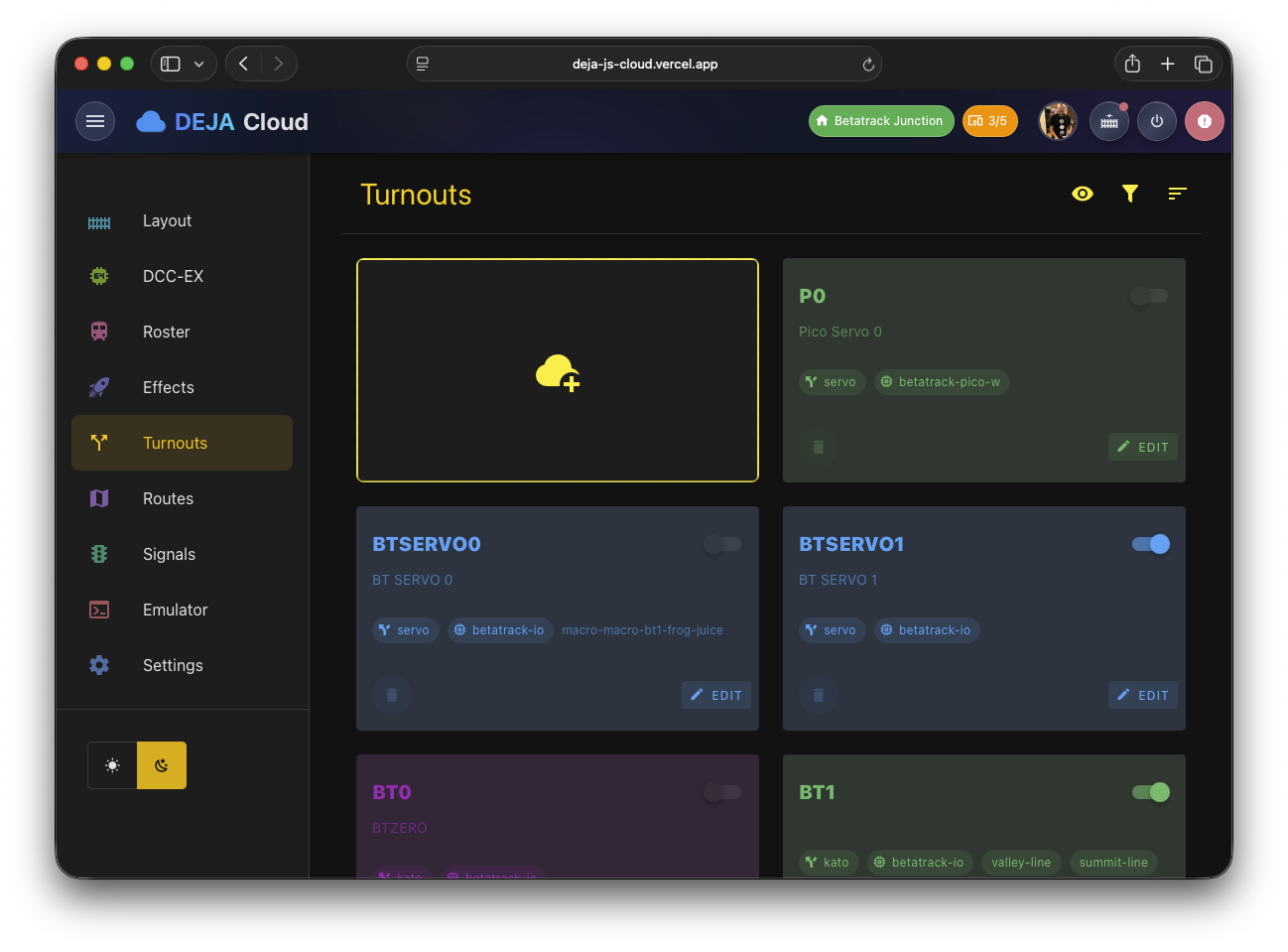
Turnout List
The main turnouts view (/turnouts) displays your turnouts in a toolbar-topped list. The toolbar provides three actions:
| Button | Icon | Function |
|---|---|---|
| View | Eye | Switch between Card View and By Device grouping |
| Filter | Filter | Show or hide tag-based filters |
| Sort | Sort Variant | Open the drag-and-drop sorter dialog |
View Modes
Your view mode preference is remembered so it carries across sessions.
- Card View -- Each turnout is displayed as an individual card in a responsive grid. This is the default view, ideal for quick scanning.
- By Device -- Turnouts are grouped by their assigned hardware device, making it easy to see which turnouts are wired to each controller board.
An "Add" tile appears at the start of the list as a visual prompt to create new turnouts.
Sorting Turnouts
Click the sort button to open the Sort Turnouts dialog. This presents all turnouts as draggable buttons arranged in a grid (up to 8 columns on wide screens). Drag and drop to reorder, then click Save to persist the new order. The new sequence is reflected across all apps.
Turnout Labels View
A dedicated labels view is available at /turnouts/labels for generating printable label sheets for your layout's turnout identification.
Adding a Turnout
Navigate to /turnouts/new or click the Add tile. The turnout form collects the following fields:
Core Fields
| Field | Description | Required |
|---|---|---|
| Name | A display name (e.g., "Main Yard Lead", "East Siding") | Yes |
| Index | The DCC turnout index as configured on the EX-CommandStation | Yes |
| Description | An optional text description of the turnout's location or purpose | No |
| Straight | The servo position or pin value for the straight (closed) route | Yes |
| Divergent | The servo position or pin value for the divergent (thrown) route | Yes |
A unique ID for the turnout is generated automatically from its name, index, and device (e.g., main-yard-lead-1-dccex).
For Servo turnouts, a Movement profile picker also appears — choose Instant, Fast, Medium, Slow, or Bounce to control how the servo eases between straight and divergent.
If the turnout is assigned to a device, a Real-time Servo Config tool lets you tune it live: an angle/pulse slider drives the physical servo in real time, Use as Straight / Use as Divergent buttons capture the current position into the form, and Test Straight / Test Divergent buttons replay the turnout's saved movement profile.
Picker Fields
Below the text fields, four large picker buttons let you configure additional properties. Clicking each button opens a dialog:
- Type -- Select the turnout mechanism type. Available options: Kato (default), Servo, Tortoise (coming soon), and DCC (coming soon).
- Device -- Choose which hardware device controls this turnout. The picker lists all devices registered in your layout.
- Color -- Pick a display color for the turnout card in the UI.
- Effect -- Optionally link an effect that triggers when the turnout is thrown (e.g., a frog juicer or an indicator light). Once an effect is linked, an Effect State toggle lets the effect fire inverted relative to the turnout's thrown state.
Tags
A tag picker component lets you assign tags to the turnout for filtering purposes. Tags are layout-level metadata that you can create and manage under Settings → Layout.
Editing a Turnout
Click any turnout card in the list to navigate to /turnouts/:turnoutId. The edit form is identical to the add form, pre-populated with the existing turnout data. Make changes and click Submit to save, or Close to discard.
Turnout Types
The system supports the following turnout mechanism types:
| Type | Description | Status |
|---|---|---|
| Kato | Kato Unitrack electric turnouts controlled via pulse signals | Available |
| Servo | Hobby servos controlled via PWM signal for precise position control | Available |
| Tortoise | Circuitron Tortoise slow-motion switch machines | Coming soon |
| DCC | DCC-controlled accessory decoders for turnout motors | Coming soon |
The turnout type determines how the DEJA.js server translates the straight/divergent values into hardware commands.
Related Pages
- Routes Configuration -- Create automated sequences of turnout throws.
- Layout Configuration -- Manage the devices that control your turnouts.
- Effects Management -- Link effects to turnout actions.